Things to keep in mind..!!

Software testing proves the existing of bugs, not their absence.

A quality tester deliver quality product to end-customer..!!

If you do not like testing your product,most likely your customer won't like to test it either.

Do not fix bugs later, fix them now..!!

Detecting and fixing bugs as early as poosible ensures to deliver quality product.

Saturday, 9 September 2017

Explain Seven Testing Principles


testing principles

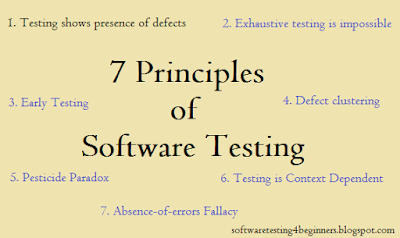
Being a Software Tester, we have to aware about Testing principles. Let's explain Seven testing principles below here:-

1. Testing shows presence of defects:- Testing never proves that there are no defects in the application. It only can show that defects are present in the application. Testing mitigates the probability of undiscovered defects existing in an application or in the software. Although, even if no defects are found in the software, it's not a that software is 100% correct.

2. Exhaustive testing is impossible:- Testing everything thoroughly (with all combinations of inputs & preconditions) isn't possible or feasible except trivial cases. We test an application on the bases of risks and priorities instead of exhaustive testing.

3. Early Testing:- Software testing activities should start at a very early stage of software development life cycle (SDLC) and should be focused on defined objectives.

4. Defect clustering:- A small numbers of units contain bunch of defects that are discovered during pre-release testing. or it shows the most operational failures.

5. Pesticide paradox:- If the same set of tests are repeated over and over again, ultimately the same set of test cases will no longer detect any new bugs. Therefore, to overcome this pesticide paradox, the test cases need to be regularly reviewed and revised.

6. Testing is context dependent:- Testing is performed differently in different contexts. For example:- critical or safety application is testing differently from an e-commerce site.

7. Absence-of-errors fallacy:- Detecting and fixing bugs or defects doesn't help if the system built doesn't fulfill the user's needs and expectations.

Thanks for reading my blog. Please leave comment below if you like this post.

Happy Testing..!!

Friday, 25 August 2017

Explain Build Verification Testing (BVT)?

bvt testing

Build Verification Testing (BVT) :- A build verification (BVT) test is a set of tests run on each new build of a product or software to verify that the build is testable, before sending it to the testing team. It is generally a short set of tests which exercise the mainstream functionality of the application. Any build that fails the build verification test is rejected, and testing continues on the previous build of the product, provided there has been at least one build that has passed the verification test. Build verification tests are highly important because they let developers know if there is any serious bug or problem with the build right away.

Continue reading...

Hi Readers, if you find it interesting, express yourself by commenting here..!!!

Tuesday, 30 May 2017

What is Black Box Testing? Advantages and Disadvantages of BBT.

Black Box Testing:- Black box testing is an approach where a tester test an application or a software without knowing the internal working of the Application Under Test (AUT). Black box testing is also referred to as functional testing, behavioral testing or input/output driven testing technique.
For example:- when this approach (black box) are applied on an application or a software, the tester only knows the inputs and what the expected outcomes should be, without knowing how the program arrives at those outcomes. For testers, it is like a black box, inside which one cannot see. Which is why we call it Black box testing.

blackbox


Definition of ISTQB:-
"Testing, either functional or non-functional, without reference to the internal structure of the component or system."

Advantages of Black Box Testing:- 
  • Tester can be non-technical.
  • Tests are done from a user's point of view that will help in revealing discrepancies in the specifications.
  • Black box tests can be re-used.
  • Expose ambiguities and complexities in an application.
  • Test cases can be designed as soon as the specification are complete.
Disadvantages of Black Box Testing:-
  • Only a small number of test cases can be executed, and many program paths will be left untested.
  • Reason for the failure of product cannot be determined.
  • Quality of coding and adherence to coding standards will be unknown.
  • Test cases cannot be designed or prepared without having clear specifications.
We can apply the following types of BBT to test an application:-
  1. Build Verfication Testing (BVT)
  2. Smoke Testing
  3. Sanity Testing
  4. Usability Testing
  5. Functional Testing
  6. Configuration Testing
  7. Compatibility Testing
  8. Retesting
  9. User Interface Testing
  10. Maintenance Testing
  11. Regression Testing
  12. Performance Testing


Saturday, 6 August 2016

What is Retesting or Confirmation Testing?

retesting


Retesting or Confirmation Testing:- Retesting is done by the tester to ensure that the defects reported in the previous build has been fixed. In Retesting, tester re-run the failed test cases.

Lets consider a scenario where a build is found to have 15 defects, which are then assigned to the developers for fixing. Once all these defects or bugs are fixed by the developers, the build is retested to verify whether the defects or bugs have been fixed or not. which is why we call it retesting or confirmation testing.

(Defect/bugs verification is also a part of Re-testing).  


Latest Manual testing Interview Questions

Friday, 1 July 2016

Difference between Smoke Testing and Sanity Testing?

smoke vs sanity
Difference between Smoke and Sanity Testing?
Smoke Testing :- Smoke Testing is a wide and shallow approach. It means we (Developer) test an application in a cursory way without going into too deep. Smoke Testing is basically performs to test the health of builds before handed over to the testing team for deep testing. It is done by developer. Some times it is also done by testers too. Smoke testing is scripted i.e. either we use test cases or automation script to test an application.
Why Smoke Testing performed?
Basically smoke testing is performed or conducted to make sure whether the most crucial functionalities of an application are working fine or not.

Sanity Testing :- Sanity Testing is deep and narrow approach. It means tester test a specific module or unit of an application thoroughly. It is also a subset of Regression testing. It is use to determine whether a small section or a module is working fine after a minor changes or not. Sanity testing is unscripted.
Why Sanity Testing performed?
Basically sanity testing is performed when developer wants to know the quick and fast status of the application after they have made changes in the code.


Friday, 24 June 2016

Severity vs Priority.


severity vs priority

Severity & Priority in Software Testing :-
There are Two things in bugs/defects of the software testing:-
Severity :- Severity tells the seriousness of a bug on the product functionality. It is assigned by Tester based on seriousness of the bug. We have got four different levels for Severity. Tester sets the severity of bug.

Severity can be categorized into following levels
1. Critical/S1 :- A defect that completely affects or hampers testing of an application/functionality is called a critical or S1 defect.
2. Major/S2 :- In S2 or Major level, Major functionality of an application doesn't work but tester can test the application.
3. Moderate/S3 :- In Moderate or S3 level, Its causing few undesirable behavior, however system or an application is still usable to a high degree.
4. Low/Cosmetic/S4 :- In Cosmetic level, only the changes are related to UI i.e. look and feel of the application. Such defect or bugs doesn't harm the application under test.

Priority :- Priority defines the order. Which bug should rectify first? Should we fix it now or later? Developer or a Project Manager decides the priority of bug.
Priority can be categorized into following levels (P1 as highest and P4 as lowest):
Urgent (P1):- Must be fixed in the next built.
High(P2):- Must be fixed in any of the upcoming builts but should be included in the release.
Medium(P3):- May be fixed after the release.
Low(P4):- May or may not be fixed at all.


Lets take the examples of Priority and Severity :-
1. High Priority and High Severity :- If a valid user goes to login panel (when it is already member) and gives valid credentials to the required fields. And system throws an error like invalid credential. It is comes under High Priority and High Severity. Therefore this bug needs to be fixed as early as possible.
 

2. High Priority and Low Severity :- Lets take an example of Flipkart.com. Suppose while updating Flipkart.com, they updated the wrong logo accidentally with spell missing like Flipart.com, here "k" is missing. It should be Flipkart.com. Now here bug is High Priority and Low Severity bug because this bug is High Priroty, therefore Flipkart has to resolve this problem to keep its brand value.
 

3. Low Priority and Low Severity :- Lets talk about well known and well used shopping website portal Flipkart.com. Everyone knows logo of Flipkart.com. Suppose while updating the website they made a spelling mistake in the content or somewhere in home page. Its fine it wont impact much. User can still use the website. This kind of bug comes under Low Priority and Low Severity. It is also called cosmetic error.
 

4. High Severity and Low Priority :- Lets take an example of an application, while using the application, if that application crashes after multiple use of functionality like: after clicking 200 clicks on save button and suddenly application gets corrupted. So such kind of bug comes under High Severity and Low Priority.

Sunday, 19 June 2016

What is Stubs & Drivers? Why We Use Stubs And Drivers? Describe with an example.

stubs & drivers

What is Stubs and Drivers. Why do we use them?
Stubs:- Stubs are simply a dummy modules, that are always recognize as "called program" or in simple, stubs are used in integration testing (top-down approach).
Stubs are generally used when sub programs are under construction.
Example:- Let us take an example of an application, where we have 3 modules ie. Login, Home and user modules. Now Login module is ready and need to go under test, so for that we need to call functions from home and user (which are not completed). Therefore, to test those modules or functions we need to write a short dummy piece of code for home and user. So that it simulates home and user, which will return any values for Login. This short dummy piece of code is called Stubs.

Drivers:- Drivers are also considered as dummy modules, that are distinguish as "calling program" that is used in bottom up integration testing.
Drivers are only used when main program are under construction.
Example:- Considering the same Example as above: When we have Home and User modules get ready and Login module is not, and we need to test Home and User modules, which return values from Login module, So to extract the values from Login module, we write a Short Piece of Dummy code for login which returns value for home and user, So these pieces of code is always called Drivers.

Thursday, 26 May 2016

Some Major Computer System Failures caused by Software Bugs earlier.

system failure
In March of 2002 it was reported that software bugs in Britain's national tax system resulted in more than 100,000 erroneous tax overcharges. The problem was partly attributed to the difficulty of testing the integration of multiple systems.

A newspaper columnist reported in July 2001 that a serious flaw was found in off-the-shelf software that had long been used in systems for tracking certain U.S. nuclear materials. The same software had been recently donated to another country to be used in tracking their own nuclear materials, and it was not until scientists in that country discovered the problem, and shared the information, that U.S. officials became aware of the problems.

According to newspaper stories in mid-2001, a major systems development contractor was fired and sued over problems with a large retirement plan management system. According to the reports, the client claimed that system deliveries were late, the software had excessive defects, and it caused other systems to crash.

In January of 2001 newspapers reported that a major European railroad was hit by the aftereffects of the Y2K bug. The company found that many of their newer trains would not run due to their inability to recognize the date '31/12/2000'; the trains were started by altering the control system's date settings.

News reports in September of 2000 told of a software vendor settling a lawsuit with a large mortgage lender; the vendor had reportedly delivered an online mortgage processing system that did not meet specifications, was delivered late, and didn't work.

In early 2000, major problems were reported with a new computer system in a large suburban U.S. public school district with 100,000+ students; problems included 10,000 erroneous report cards and students left stranded by failed class registration systems; the district's CIO was fired. The school district decided to reinstate it's original 25-year old system for at least a year until the bugs were worked out of the new system by the software vendors.

In October of 1999 the $125 million NASA Mars Climate Orbiter spacecraft was believed to be lost in space due to a simple data conversion error. It was determined that spacecraft software used certain data in English units that should have been in metric units. Among other tasks, the orbiter was to serve as a communications relay for the Mars Polar Lander mission, which failed for unknown reasons in December 1999. Several investigating panels were convened to determine the process failures that allowed the error to go undetected.

Bugs in software supporting a large commercial high-speed data network affected 70,000 business customers over a period of 8 days in August of 1999. Among those affected was the electronic trading system of the largest U.S. futures exchange, which was shut down for most of a week as a result of the outages.

In April of 1999 a software bug caused the failure of a $1.2 billion military satellite launch, the costliest unmanned accident in the history of Cape Canaveral launches. The failure was the latest in a string of launch failures, triggering a complete military and industry review of U.S. space launch programs, including software integration and testing processes. Congressional oversight hearings were requested.

A small town in Illinois received an unusually large monthly electric bill of $7 million in March of 1999. This was about 700 times larger than its normal bill. It turned out to be due to bugs in new software that had been purchased by the local power company to deal with Y2K software issues.

10· In early 1999 a major computer game company recalled all copies of a popular new product due to software problems. The company made a public apology for releasing a product before it was ready.

· The computer system of a major online U.S. stock trading service failed during trading hours several times over a period of days in February of 1999 according to nationwide news reports. The problem was reportedly due to bugs in a software upgrade intended to speed online trade confirmations.

11· In April of 1998 a major U.S. data communications network failed for 24 hours, crippling a large part of some U.S. credit card transaction authorization systems as well as other large U.S. bank, retail, and government data systems. The cause was eventually traced to a software bug.

12· January 1998 news reports told of software problems at a major U.S. telecommunications company that resulted in no charges for long distance calls for a month for 400,000 customers. The problem went undetected until customers called up with questions about their bills.

13· In November of 1997 the stock of a major health industry company dropped 60% due to reports of failures in computer billing systems, problems with a large database conversion, and inadequate software testing. It was reported that more than $100,000,000 in receivables had to be written off and that multi-million dollar fines were levied on the company by government agencies.

14· A retail store chain filed suit in August of 1997 against a transaction processing system vendor (not a credit card company) due to the software's inability to handle credit cards with year 2000 expiration dates.

15· In August of 1997 one of the leading consumer credit reporting companies reportedly shut down their new public web site after less than two days of operation due to software problems. The new site allowed web site visitors instant access, for a small fee, to their personal credit reports. However, a number of initial users ended up viewing each others' reports instead of their own, resulting in irate customers and nationwide publicity. The problem was attributed to "...unexpectedly high demand from consumers and faulty software that routed the files to the wrong computers."

16· In November of 1996, newspapers reported that software bugs caused the 411 telephone information system of one of the U.S. RBOC's to fail for most of a day. Most of the 2000 operators had to search through phone books instead of using their 13,000,000-listing database. The bugs were introduced by new software modifications and the problem software had been installed on both the production and backup systems. A spokesman for the software vendor reportedly stated that 'It had nothing to do with the integrity of the software. It was human error.'

17· On June 4 1996 the first flight of the European Space Agency's new Ariane 5 rocket failed shortly after launching, resulting in an estimated uninsured loss of a half billion dollars. It was reportedly due to the lack of exception handling of a floating-point error in a conversion from a 64-bit integer to a 16-bit signed integer.

18· Software bugs caused the bank accounts of 823 customers of a major U.S. bank to be credited with $924,844,208.32 each in May of 1996, according to newspaper reports. The American Bankers Association claimed it was the largest such error in banking history. A bank spokesman said the programming errors were corrected and all funds were recovered.

19· Software bugs in a Soviet early-warning monitoring system nearly brought on nuclear war in 1983, according to news reports in early 1999. The software was supposed to filter out false missile detections caused by Soviet satellites picking up sunlight reflections off cloud-tops, but failed to do so. Disaster was averted when a Soviet commander, based on a what he said was a '...funny feeling in my gut', decided the apparent missile attack was a false alarm. The filtering software code was rewritten.

Tuesday, 12 April 2016

What is V - Model - Advantages, Disadvantages And When to use it

V - Model :- V - Model testing means "Verification and Validation Model". Like the Waterfall model, the V shaped life cycle is a sequential path of execution of processes. Each phase should be completed before the next phase begins. Testing of the product is done parallel with a corresponding phase of SDLC. That is also called Review, Inspection or Static Testing.
When to use V - Model :-
Where time and cost is the constraints of the project then, we can use such models for quick and cost effective delivery. In comparison with Waterfall model, V model is more or less the same, but the activity of testing starts very early. Whcih leads to less time and cost of the project.
v model

Let's discuss Verification and Validation Phase in detail :- 

Verification Phase :-

1. BRS (Business Requirement Specification) :- This phase includes studying the product requirements from the customer perspective.
2. SRS (System Requirement Specification) :- Deals with understanding and detailing the hardware and communication setup for the product under development.
3. HLD (High Level Design) :- SRS can be broken down further into modules taking up different functionality which is also referred to as High Level Design. It is also called Architectural Design.
4. LLD (Low Level Design) :- The internal design for all the system modules is listed out and is also known as LLD. It is also called Module Design.
5. Coding :- In this phase developer writes code.

                        Validation Phase :-

1. Unit Testing :- Unit test cases that were created in the Low Level Design phase are executed in Unit Testing. Unit Testing is conducted by developers only. In this testing, developer test code to find out any bugs or problem in the particular unit or module.
2. Integration Testing :- In Integration Testing the integration test cases which were created in the Architectural or High Level Design phase are executed. In this phase, we integrate more then one unit or module together to find out any cause or bug during  the interconnection of different different units or modules together. This phase is conducted by developer and tester both.
3. System Testing :- In System Testing functional and non-functional test cases are executed. This testing is associated with System Requirement Specification (SRS) phase. In this tester checks the entire system for its correctness and completeness.
4. Acceptance Testing :- Acceptance Testing is conducted to make sure that the Business Requirement Specification (BRS) are met in the user environment. In this testing we also uncover the compatibility and non-functional issues like performance, load, stress etc.

Advantages of V-Model :- 
It is very good approach to choose V-Model, where projects are small and easy to understand. As it is very easy to use.
In V-Model one phase is completed before the next phase is begin.
Works well where Requirements are clearly defined.
* Easy to manage due to robustness of the model.
Disadvantages of V-Model :-
High risk and less flexibility.
* Not a good model for large and complex projects.
* Not good where requirements are frequently change.
* Working software is not available until the last phase of the life cycle.

Thursday, 7 April 2016

Phases of Software Development Life Cycle (SDLC)

Let us explain each stages of Software Development Life Cycle (SDLC) :-
sdlc life cycle

1. Requirement Gathering/Analysis :- In this initial phase Top level management of the development company or a Business Analyst will collect all the information from the end-user or customer. Then prepare BRS and SRS documents.
BRS (Business Requirement Specification):- BRS is nothing but a document which consists of correct and complete requirements to develop a new s/w.
SRS (Software/System Requirement Specification):- SRS is also a document that specifies the, how to develop a new s/w.

2. Design :- In design phase HLD document and LLD document is prepared.
HLD (High Level Design or Architectural Design):- This document provides overall architecture of s/w in diagrammatic notation.
LLD (Low Level Design):- This document specifies internal logic of each and every module or functionality in diagrammatic notation.

Note:[HLD is software Level, and LLD is Module LEvel Design].

3. Coding :- In this phase coding part is started. This is one of the longest phase of SDLC. Coding phase is also known as Development phase.

4. Testing :- Testing phase is basically done by Testers or Test Engineers. In this phase testers performed different kind of testing. In this, testers assure by testing an application that the build given by developer to the testing team is fulfill end-user expectations.

5. Implementation :- After testing the software developer and tester will deploy and implement the developed software or application for the customer or end-user use. This phase also known as a Deployment phase.

6. Maintenance :- After deployment of an application or product on customer end, customer starts using that application or product. So if any changes is required further, it comes under Maintenance. In short:- We as a software company care and support of that developed product or an application. This phase also known as a Support phase.

Waterfall Model/Linear Sequential Model

1. Waterfall Model :- The Waterfall model is a popular and traditional version of the SDLC model for developing software. It specifies a sequential flow which the software must undergo.
Imagine a waterfall on the cliff of a steep mountains, once the water has flowed and begun its journey down the side, it can not turn back. The same case with the Waterfall mode, once a development phase is completed the development proceeds to the next phase and there is no back tracking possible. It is also called Linear Sequential Model.
The phases of Waterfall model are :-
1. Requirement Gathering/Analysis
2. Design
3. Coding
4. Testing
5. Implementation
waterfall model

1. Requirement Gathering/Analysis :- In this phase business analyst gather information about what the customer needs, and analysis all aspect related to requirement and other details. All the information collected from the customer is captured in a formal document called System Requirement Specification(SRS). Which serves as an input to the next phase.
2. Design :- In this phase we define the hardware and software architecture, components, modules, interfaces and data to satisfy the requirement specified in the SRS documents.
3. Coding :- Based on the system design document the developers starts coding. The system is developed in units. Complete integration of small units is performed to create the final software package.
4. Testing :- In this phase, both units and integrated once are verified to ensure that they are error free and meet the customer requirements which is given in the SRS document.
5. Implementation :- In this phase we deploy the developed product in its target location/environment. This task is performed by developers with the help of some tools like compilers, debuggers, interpreters etc.

Waterfall Model is suitable for the project where :-
1. Requirement are clearly defined
2. Usefull for small and medium time duration projects
3. Use where technology is stable
4. Familier with the domain and development environment.

Advantages of Waterfall model :- 
1. Simple and easy to use and understand.
2. It works for small projects where requirements are clearly defined.
3. Project under control.
4. Predefined outputs at every cycle.
5. Early identifucation of slippage if any.

Disadvantages of Waterfall model :- 
1. Poor for long and large projects
2. Risk chances is higher
3. Backtracking is not possible
4. Not feasible for complex projects
5. Customer requirement may change


Wednesday, 6 April 2016

Software Development Models Or Methodologies

Software dev models

Software Development Models :- Models are the process or methodologies that are being used for developing a software or project depending on the software or project aims and goals. In short:- Models are the simplification of the overall process to develop a software/project.There are some software development models or methodologies available for developing a software :-
1. Waterfall Model
2. V Model
3. Incremental Model
4. RAD Model
5. Agile Model
6. Iterative Model
7. Spiral Model 

Choosing right model for developing a software/project is very important. Now a days Agile methodology is most popular and used model in the market. Waterfall Model is very traditional model.

Friday, 1 April 2016

What is Software Development Life Cycle (SDLC)

  • Software Development Life Cycle (SDLC) :- Software Development Life Cycle (SDLC) process is a model plan by which we assure/plan that how to create, develop, implement and eventually close the software.                                                                       OR                                                                        
  • It is a process outlining how the software will born, raised and eventually retired from its functioning.

In Simple words :- Software Development Life Cycle (SDLC) is a complete plan or process that define the stages and steps to develop a Quality Software.
Proper understanding of the stages involved in the SDLC process ensure timely development of software product.
Here are the different stages which we have to gone through in the Software Development Life Cycle (SDLC) process are shown below in the form of image :-
SDLC
To know more about Stages of SDLC click here at : Stages of SDLC

Wednesday, 30 March 2016

What is Review, Walkthrough, Peer Review and Inspection?


    rwpi

    • What is Review, Walkthrough, Peer Review and Inspection? 
    1. Review :- Review is a testing technique to verify correctness and completeness of documents. Such as BRS, SRS, HLD and LLD.

    Note:- We will discuss BRS, SRS, HLD and LLD later on..

    2. Walkthrough :- 
    Walkthrough is also a testing technique to Study a document from first to last for its correctness and completeness.
    3. Peer Review :- The comparison of two similar documents point-to-point for its completeness and correctness.
    4. Inspection :- Inspection is a process of searching a specific factor in documents is called an Inspection.
    • What is PIN (Product/Project Initiation Note) in Testing?
    PIN is a document consists of proposal and overall plan to develop a new Software(s/w). 

    When to Start and Stop Software Testing ?


    when testing start and stop

    • When software testing should start?
    A most frequent and important question asks in interview as well as arise in the SDLC phase that "When should start a software testing?"
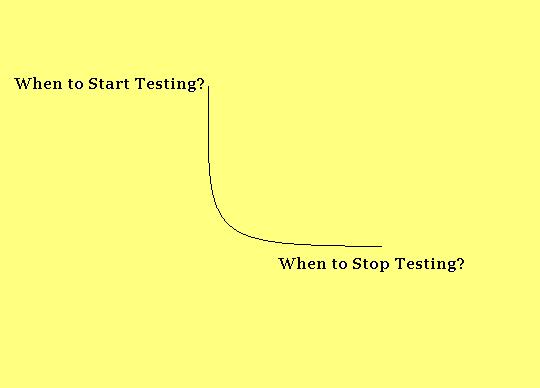
    So, Testing starts as early as initial phase i.e. Requirement gathering phase and continues till Release/Maintenance phase. The purpose of testing as early in the requirement phase, because if we found any defect or issue in the later phase of SDLC, then the cost of fixing bugs is raised. Therefore, to overcome from this situation, we must need to start testing at the right from the initial phase of SDLC.

    • When to stop Testing?
    Another most important question from interview perspective is:- "When to stop testing?"
    Here are few things we should keep in our mind before stop Testing of any application or product:-
    1. Bug rate reaches below down a certain level.
    2. Tester should stop testing when testers are not getting high priority bugs.
    3. Stop when tester meets the project deadline.  
    4. Less ratio of critical bugs.
    5. Test budget has reaches its limit. Or comes to an end.
    6. Stop when Alpha testing and Beta testing gets completed.
    7. Stop when code/design, functionality and requirement reaches a specific point.

    Tuesday, 29 March 2016

    Difference between Error, Fault/Defect/Bug & Failure

    error,defect,failure

    • Difference between Error, Defect/Bug & Failure :-
    Error :- Any incorrect human activity or action that produces a problem in the system is called and Error.
    Fault/Defect/Bug :- Deviation from expected behavior to the actual behavior of the system is called Defect/Bug.
    Failure :- The deviation identified by the end-user while using the software or system is called Failure.
    Note :- [Bug is nothing but a technical slang used for a defect..]  

    • Reason of defects in Software :-
    1. Incorrect Requirement
    2. Wrong/Poor Design.
    3. Poor coding.
    4. Complex Business Logic.
    5. Complex Technology.
    6. Work Pressure.
    7. Frequently changing in Requirements.

    Tester :- An Introduction

                            
    tester intro

    Tester :- An Introduction :--
    A professional, who exercises software testing is known as a Tester.
    Characteristics of Tester :-
    1. Creative Thinker.
    2. Ability to take the point of view of the end-user.
    3. Creative intent with destructive approach.
    4. Must be aware of the testing techniques and tools.
    5. Must posses the domain knowledge.
    Roles and Responsibilities of a Tester :-
    There are misconception about responsibilities of a tester that he/she fixes the defects. Testers initial responsibilities are to :-
    1. Design and develop test cases.
    2. Execute test cases.
    3. Perform defect isolation and reporting.

    Objectives of Software Testing

                            objectives of tester
    Objectives of Testing :-
    There are few objective of Testing which we know about :-
    1. Gathering information/Requirement from client or end-user.
    2. Tester must have Domain Knowledge.
    3. Tester must have testing tools and technology knowledge.
    4. To identify defects.
    5. To ensure product correctness.
    6. To ensure quality improvement of the product. Or Increase quality.
    7. To make sure software works according to the customer requirements and specifications.
    8. To reduce the failure risk.
    9. Adhere time duration.
    10. Must be creative.
    11. Must have strong analytical skills.

    Monday, 28 March 2016

    Know about Testing Principles, Testing v/s Debugging and many more..

    testing principles

    Manual Testing :- Manual Testing is a process in which Tester test an application, software or system manually. In other words, testing an application without using any Automation tool  i.e. QTP, Selenium etc. is called a Manual Testing 

    Define Software :- Software is a set of executable programs in our computer. Software is classified into three categories :-
    1. System Software.
    2. Programming Software.
    3. Application Software.

    • System Software :- A software that provides a platform, on which application software can actually execute. Example of System Software is, Operating System, Servers etc.
    • Programming Software :- A software offering programming and application tools that a developer can use to debug and maintain applications. Example of Programming Software is, Compiler, Debuggers and Interpreters.
    • Application Software :- A group of programs that provides the computer a compatibility to execute data processing tasks for a specific user. Example of Application Software is, Internet Browser and Mobile gaming software.  
    Software Testing :- Software Testing is a process of checking the correctness and completeness of a S/W with regard to customer requirements and expectations is called a Software or System Testing.

                                                     OR
    Software Testing is a process of determining whether the product developed by developer is a quality product and to assure that the developed product is working as per customer requirements and specifications.
                                     
                                              Testing v/s Debugging
    Testing :- Testing is a process or set of activities performed with an intent to identify errors or defects in the software under test.
    Debugging :- Debugging is the process of fixation of errors or defects by the developers.

                                      -: Testing Principles :-  
    Being a Software Tester we have to aware about Testing Principles which are given below:-

    Quality Assurance v/s Quality Control

    QA vs QC

    Quality Assurance v/s Quality Control
    Quality Assurance:- To deliver a quality s/w or product to customer, an organization is monitoring and measuring the strength of software development process. This process is known as Quality Assurance.

    Quality Control:- During s/w development, an organization is validating each deliverable for correctness and completeness. This validation is known as Testing or Quality Control.